![509383c8-8b3f-40e4-a2c1-c7c325b16164-3.webp]](https://myfliip-21229458.hs-sites.com/hs-fs/hubfs/509383c8-8b3f-40e4-a2c1-c7c325b16164-3.webp?height=50&name=509383c8-8b3f-40e4-a2c1-c7c325b16164-3.webp)
💡 Prerequisite: This feature requires the staff member assigned to the appointment to have their Google Calendar connected to FLiiP. Make sure this is set up before creating virtual appointments.
Step 1 – Enable the "Online Appointment Only" option on a service
- Go to Services.
- Open the service you want to configure as online.
- Look for the "Online appointment only" dropdown and select the option"enable auto-generation of Google Meet links".
- Save your changes.
⚠️ Important limitation: A service must be configured as 100% online. Mixing in-person and remote sessions within the same service is not supported.
Step 2 – Book an appointment for an online service When creating an appointment for an online-only service:
- If the assigned staff member has Google Calendar connected, a Google Meet link is automatically generated and saved to the appointment record.
- If the assigned staff member does not have Google Calendar connected, an inline warning will appear. You can still save the appointment, but no Meet link will be generated.
📌 Selecting a staff member is mandatory before saving an online appointment.
What happens next
Appointment details
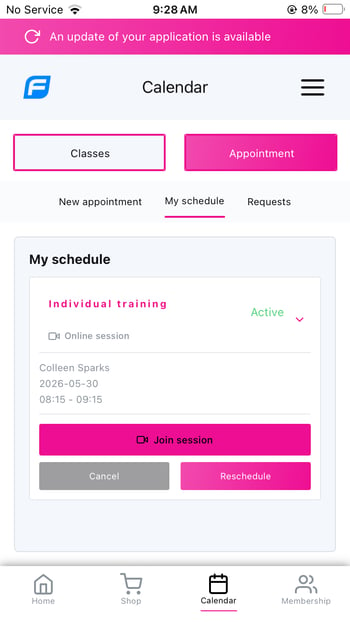
The Google Meet link is visible directly in the appointment detail view in FLiiP, for both staff and members:
- Admin/staff: in the FLiiP back-office
- Member: on the web portal and the mobile app
Confirmation email
The Google Meet link is automatically included in the member's appointment confirmation email at the time of booking:
Reminder notifications
The Meet link is also included in any reminder emails sent before the appointment. Managing online appointments
Manually overriding the Google Meet link
An admin can manually edit the Google Meet link on any appointment. If it is a recurring appointment, only the modified occurrence is updated — other recurring sessions remain unchanged.
Rescheduled appointment
If an online appointment is rescheduled, the Google Meet link is automatically updated in both FLiiP and Google Calendar.
Cancelled appointment
If an online appointment is cancelled, the associated Google Calendar event is also cancelled automatically.