![509383c8-8b3f-40e4-a2c1-c7c325b16164-3.webp]](https://myfliip-21229458.hs-sites.com/hs-fs/hubfs/509383c8-8b3f-40e4-a2c1-c7c325b16164-3.webp?height=50&name=509383c8-8b3f-40e4-a2c1-c7c325b16164-3.webp)
Creating developer accounts is required for app publishing. Please note, these accounts incur costs that are not managed by FLiiP.
Website
To meet Google’s requirements, your organization must have an active website.
Your organization’s website must be publicly available, and the domain name must be associated with your organization.
- Privacy policy (template), terms and conditions (LINK), and contact form that are directly accessible on your website. We recommend placing it in the footer of the page.
-
Your own domain, with HTTPS enabled.
Once created, please email the following to mobile.whitelabel@myfliip.com with your CSM in CC.
- Website URL
- Example:
https://myfliip.com/
- Example:
We will then provide you with a verification code, which you’ll need to add to your domain configuration to complete domain verification with Google. (LINK to general instructions)
- Example of code:
google-site-verification=DHEIWI383DHugEDHEU8838HD02
Configure Apple Developer Account
- Follow the steps outline HERE to create an Apple Developer Account as an organization.
- Requirements:
- The account holder must have legal authority to bind your organization (e.g., owner, executive, or senior manager).
- Use your legal entity’s name
- Use the official, registered legal name of your company.
- Do not use a trade name, DBA (Doing Business As), or fictitious name for this field.
- The legal entity name is what appears as the "seller" of your apps.
- D-U-N-S Number
- Your organization’s phone number and email address
- Pay the annual $99 USD developer fee.
Once set up, invite mobile.whitelabel@myfliip.com to your account as Admin (LINK to the instructions).
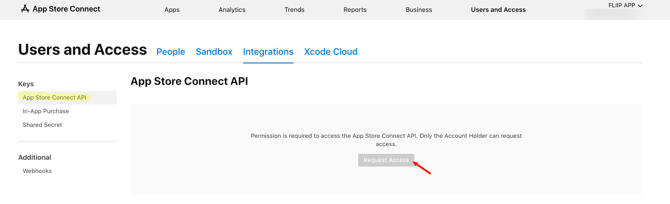
- Then using the Account Holder account, go to
- Users and Access (HERE) - Integrations tab - section App Store Connect API, click on "Request Access" and follow the steps.
Configrue Google Play Developer Account
- Follow the steps outline HERE to create an Google Play Developer Account as an organization.
- Requirements:
- D-U-N-S Number (same as used for the Apple Account)
- Developer profile contact information (email address and phone number)
- One-time registration fee: $25 USD
Once set up, invite mobile.whitelabel@myfliip.com to your account as Admin/Editor (LINK to the instructions).
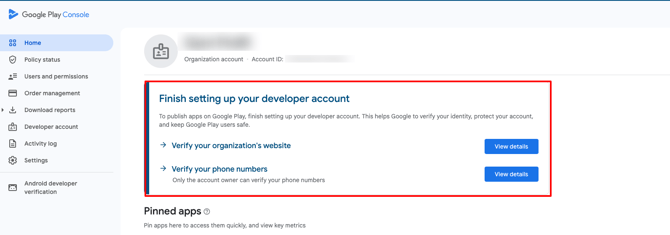
- Make sure there is no warning saying "Finish setting up your developer account". If it appears, please follow the indicated steps to complete the configuration.