![509383c8-8b3f-40e4-a2c1-c7c325b16164-3.webp]](https://myfliip-21229458.hs-sites.com/hs-fs/hubfs/509383c8-8b3f-40e4-a2c1-c7c325b16164-3.webp?height=50&name=509383c8-8b3f-40e4-a2c1-c7c325b16164-3.webp)
Step 0
URL: https://console.cloud.google.com/iam-admin/iam
If prompted, sign in using the Google Developer account (owner account) created previously for your organization.
Make sure you have the Organization Policy Administrator (Administrateur de règle d'administration) role assigned at the organization level.
If you already have this role, you can proceed with the next steps.
If not, ask your organization administrator to assign it to you by following the instructions in the current ‘Step 0’ section.
Verify that you are in your organization instead of project by clicking on the top-left corner 
Make sure to select the one with the “Organization” type 
Then click on “IAM” on the left side menu 
Click on the pencil icon next to the user you want to assign that role to

Click on “Add Another Rule”

Search for the “Organization Policy Administrator” or “Administrateur de règle d'administration”
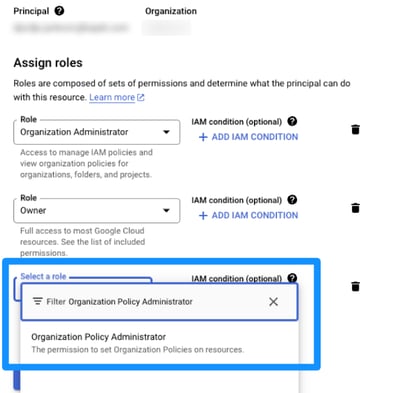
Select it and click “Save” to apply the changes

💡 Watch the VIDEO for a clearer, step-by-step visual guide to the following steps.
Disable allowedPolicyMembers
URL: https://console.cloud.google.com/iam-admin/iam
If prompted, sign in using the Google Developer account (owner account) created previously for your organization.
Make sure you are still in your organization (top-left corner), not project.
Click on “Organization Policies” on the left side menu

Click on “View constraints” and find allowedPolicyMembers

Click on “Edit Policy”

Click on “Override parent’s policy”

Click on “Add a rule”

In “Enforcement”, select “Off”, then click “Set policy”

Disable disableServiceAccountKeyCreation
- Go back to the “Organization policies” page and search for disableServiceAccountKeyCreation
- Do the same steps as for the above

Disable allowedPolicyMemberDomains
Go back to the “Organization policies” page and search for allowedPolicyMemberDomains

Click on “Edit policy”

Select “Override parent's policy” and “Replace”

Click on “Add a rule”

Select “Allow All” and Click on “Set policy”

Add FLiiP to your project
Make sure you're in the project you created earlier in Firebase.
-
To switch, click on top left rectangle, ex. FLiiP.
-
In the “Select a resource” panel, choose project instead of organization.

Go to “IAM”, Click on "Grant Access"

Enter mobile.whitelabel@myfliip.com as email, and assign the role of Editor 
Verify the entered information and click on “Save”

Firebase
🔗 URL: https://console.firebase.google.com/
Make sure you're in the project you created earlier.
-
Top left menu → Project settings (gear icon) → Users and permissions


-
If you don’t see FLiiP, click on “Add member”
-
Enter mobile.whitelabel@myfliip.com as email address
-
Assign the role of Editor
-
Click on “Add member” in bottom right corner

Done ✅